








Everything we learned shipping four versions of the same app, each using a different way to talk to Gemini Nano.
Source code: luciqai/AICore-Experiment
We’re also building a way to observe on-device AI performance in production, correlated with the crashes, ANRs, hangs, and session replays you’re already collecting. More on that at the end.

Why On-device Models Matter
Every server-side LLM request adds latency, costs money, and requires an internet connection. On-device AI avoids all three. In the past, that meant bundling a large model and runtime with your app.
Now, Android provides Gemini Nano through AICore, a system service that Google updates independently of your app. Your APK doesn’t include the model, it simply communicates with the service already installed on the device.
So the question is no longer whether you can run an LLM on-device, but which AICore API you should use and what the trade-offs are.
To find out, we built AICore-Experiment, an Android app with four identical product flavors, each using a different on-device AI dependency. This let us compare them fairly and measure their real-world impact instead of relying on documentation alone.
Gemini Nano | Limitations and Challenges
- Device fragmentation limits availability to only recent flagship models due to chip requirements.
- Not available on rooted devices for privacy/security.
- Has an inference quota limiting:
- Number of simultaneous requests (too many cause "busy" error).
- Daily number of model invocations to manage battery consumption.
- Model’s output constrained by token limits, making it better suited for tasks like summarization over lengthy free-text generation.
Context Limitations
- Total context window: 4,096 tokens
- Per-prompt limit: 1,024 tokens
- Summarization max: ~3,000 words
- No persistent memory: Context resets between sessions
What Gemini Nano Cannot Do
Complex multi-step reasoning comparable to cloud models
Long-form content generation (essays, articles)
Image or video generation (different model required)
Real-time knowledge (no internet access)
Fine-grained image details in complex scenes
The Three Ways to Reach Gemini Nano
There isn’t just one way to use Gemini Nano. Android provides three API layers, each offering a different balance between simplicity and control. We also included a fourth option with no AI dependency at all, giving us a baseline for comparing app size.
- AICore SDK (com.google.ai.edge.aicore): a thin, low-level binder client straight to the AICore system service. Best for: minimal footprint, full prompt control.
- ML Kit GenAI (com.google.mlkit:genai-*): high-level, task-specific APIs on top of AICore, via Play Services. Best for: shipping a concrete feature fast, on real devices, today.
- ADK for Android (com.google.adk:google-adk-kotlin-core-android): an agent framework, the same ADK used server-side, with an on-device model backend. Best for: tool-calling / agentic UX, hybrid on-device + cloud agents.
AICore SDK | The Low-level Path
You build a GenerativeModel with a generationConfig (temperature, topK, maxOutputTokens) and a DownloadConfig, call model.prepareInferenceEngine() - which triggers the on-device model download the first time, reported via a DownloadCallback - then stream tokens with model.generateContentStream(prompt). Text-only, no built-in chat templating, no function calling. minSdk 31, the dependency resolves from Google’s Maven repo (not Maven Central), and it’s marked -exp: experimental; the API can change between drops.
val model = GenerativeModel(
    generationConfig = generationConfig {
        context = appContext
        temperature = 0.3f
        topK = 16
    },
    downloadConfig = DownloadConfig(downloadCallback),
)
model.prepareInferenceEngine()
model.generateContentStream(prompt).collect { chunk -> print(chunk.text) }
Reality check: on the newest Nano 3 runtime (Galaxy S26 in our testing) this API throws a RESPONSE_PROCESSING_ERROR - it can drive the model but can’t parse Nano 3’s responses, and it applies no chat template of its own. For anything beyond a toy, use ML Kit GenAI instead. Keep the AICore SDK in your back pocket for cases where the ~60 KB footprint genuinely matters more than reliability today.
ML Kit GenAI | The Path that Actually Works
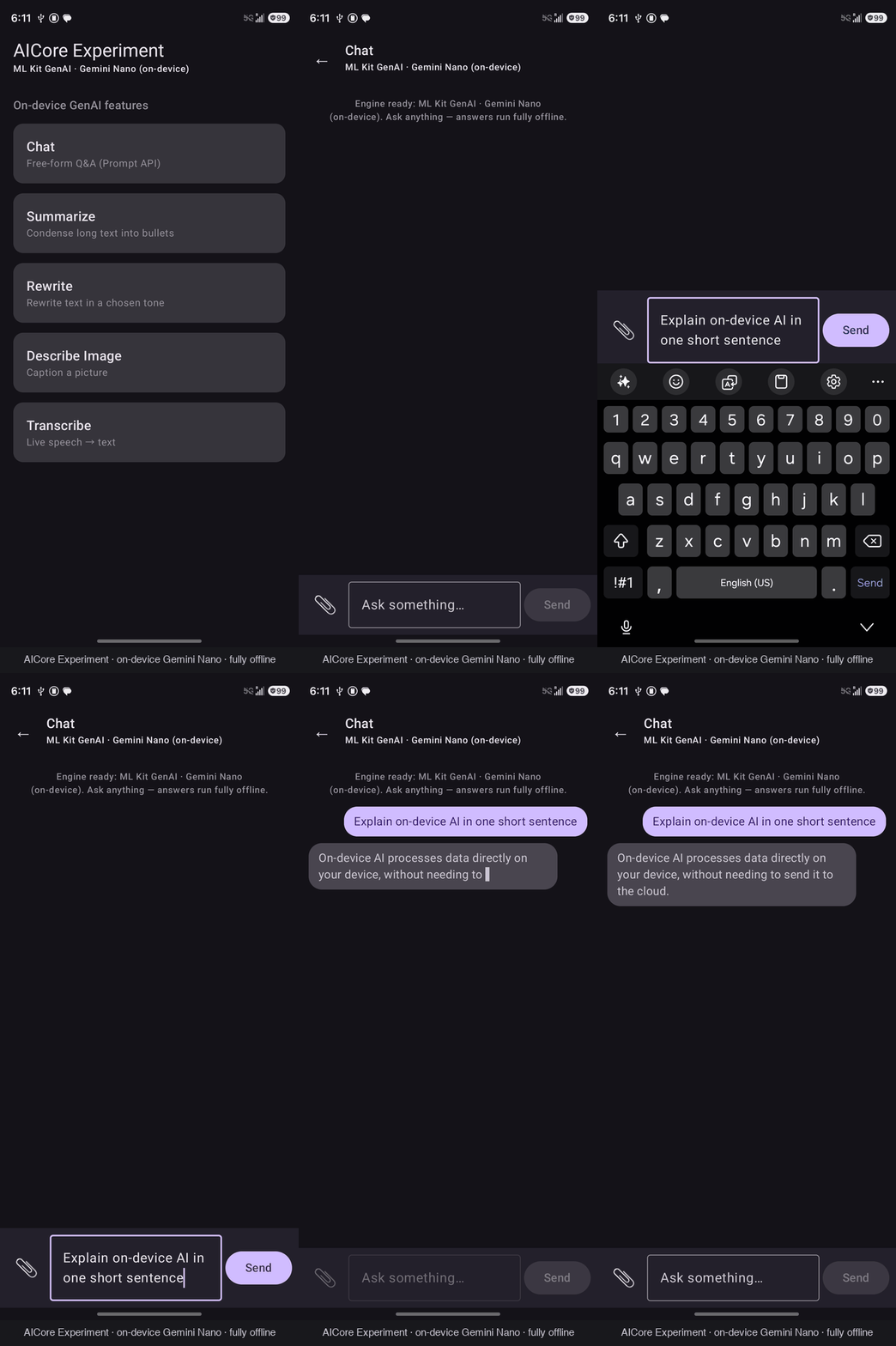
Five task-specific client APIs, all Gemini-Nano-backed, all on-device:
- Prompt (genai-prompt, 1.0.0-beta2) — free-form text or multimodal (image + text) prompting, the general-purpose one.
- Summarization (genai-summarization, 1.0.0-beta1) — article or conversation to 1-3 bullet points.
- Rewriting (genai-rewriting, 1.0.0-beta1) — rewrite a message in a different tone.
- Image Description (genai-image-description, 1.0.0-beta1) — short caption for an image (accessibility, alt-text).
- Speech Recognition (genai-speech-recognition, 1.0.0-alpha1) — mic to text, Gemini-Nano “Advanced” mode with automatic fallback to on-device “Basic” ASR.
Every one of these follows the same lifecycle:
when (client.checkFeatureStatus()) {
    AVAILABLE   -> Unit                              // ready to run
    UNAVAILABLE -> return                             // unsupported device, degrade gracefully
    else        -> client.downloadFeature(callback)   // DOWNLOADABLE / DOWNLOADING
}
val result = client.runInference(request).await()
client.close()
The Prompt API supports streaming for text and single-shot multimodal requests (image + text). Task-specific APIs download their own small adapter models layered on the shared base — e.g. the Summarization adapter is only about 27 MB, fetched over Wi-Fi independent of the base Nano model.
Caveat: Speech Recognition is alpha, and its Gemini-Nano “Advanced” mode is Pixel-10-only today; every other supported device transparently falls back to “Basic” on-device ASR.
ADK for Android: Agents with Tools, On-device
The Agent Development Kit, yes, the same one used to build server-side Gemini agents, now runs on Android with a GenaiPrompt model backend that wraps ML Kit’s GenerativeModel. You get LlmAgent, Tool-annotated functions (bindings generated at compile time via KSP), and a runner, fully offline.
We wired up four local tools - getCurrentDateTime(), getBatteryStatus(), getDeviceInfo(), addNumbers(a, b) - and verified real tool-calling end to end: “What’s my battery level?” leads the agent to call getBatteryStatus(), which answers with the actual BatteryManager reading.
val agent = LlmAgent(
    name = “device_assistant”,
    model = GenaiPrompt.create(generativeModel = Generation.getClient(), name = “gemini-nano”),
    instruction = Instruction(“You are a helpful on-device assistant with exactly these tools: …”),
    tools = DeviceToolsService(context).generatedTools(),
)
val runner = InMemoryRunner(agent = agent, appName = “aicore-experiment”)
The catch: verified by reading the ADK 0.4.0 bytecode, structured function-call handling only exists on the cloud Gemini backend. The on-device GenaiPrompt backend has no tool-execution path, and the ML Kit Prompt API itself has no function-calling parameter to hook into. Nano still emits its trained tool_code toolName() convention as plain text, it just never gets executed. This matches Google’s own hybrid guidance (cloud agent orchestrates tools, on-device sub-agents are text-only), but it means on-device tool calling isn’t a checkbox you flip, you have to close the loop yourself:
- Regex-match Nano’s tool_code text for a known tool name.
- Invoke that tool locally.
- Feed the result back into a second model turn to produce the final answer.
A hand-rolled ReAct loop, in other words. We also had to pin exact tool names into the agent’s system instruction - left to itself, Nano hallucinated a plausible-but-wrong battery_level().
Integration tax: ADK pulls in the google-genai cloud client and its auth transitives even though you only use the on-device path, which means packaging excludes (META-INF/INDEX.LIST, META-INF/DEPENDENCIES) and one hard dependency exclude (net.sf.kxml:kxml2, which bundles a copy of org.xmlpull.v1.* that Android’s platform already provides and R8 refuses to reconcile).
What It Costs Your APK
This is the number every “should we ship this” conversation actually needs. We measured release App Bundles (R8 + resource shrinking on) with bundletool, against a Galaxy S26 device spec, across all four flavors:
The multi-gigabyte Nano model lives in the AICore system app, not your APK; the SDK is essentially just a binder client. ML Kit GenAI costs about 15x more download weight than raw AICore because it bundles five feature clients plus the Play Services stack they ride on. ADK lands just under that despite pulling in an entire agent framework: R8 shrinks its transitive graph hard enough to land below the five-API ML Kit bundle.
Does It Actually Run? Yes, Verified On-device
Bundle-size math is only half the story; we also confirmed live inference on a Galaxy S26 (AICore beta channel): Gemini Nano 3 [NPU], a 4.2 GB base model fetched once over Wi-Fi, answering fully offline. The ML Kit GenAI Prompt API path worked end-to-end with streaming, multi-turn history, Markdown rendering, and multimodal (image) input,. all with zero network calls after the model download. The ADK flavor’s tool-calling loop (battery percentage, current date/time) also verified against real device APIs, not mocked data.
Decision Guide
- Need a concrete feature shipping now (summarize, rewrite, caption, transcribe)? Use ML Kit GenAI’s task APIs.
- Need free-form or multimodal prompting with the smallest possible footprint? Use the ML Kit GenAI Prompt API, not raw AICore, given the Nano 3 caveat above.
- Need the absolute minimum dependency weight, and you control the runtime risk? Use the AICore SDK directly, and accept that it’s experimental and may break per device.
- Need on-device tool-calling or agentic UX? Use ADK for Android, and budget time for the manual ReAct loop.
- Need to know none of this is silently degrading in production? Instrument it yourself: duration, refusal rate, and device signals (thermal, memory, main-thread stall) at minimum, regardless of which layer you pick.
What’s Next
On-device AI introduces different challenges than server-side AI. Instead of network errors or timeouts, you might see slow responses causing UI hangs or ANRs, heavy workloads leading to out-of-memory crashes, or long-running inference draining the battery and overheating the device.
These issues don’t appear in traditional LLM monitoring tools because there’s no network request to track.
We’re building a solution that monitors on-device AI performance directly on the device and correlates it with crashes, ANRs, hangs, and session replays you’re already collecting. Stay tuned.