











Android app beta testing puts a near-final build in the hands of real users on real devices before launch. With thousands of Android device and OS combinations, it's the most reliable way to catch crashes, performance issues and UX friction your test lab missed. We'll covers testers, tools, questions and timelines to help you get ready for Android app beta testing.
Android app beta testing is a phase of the software development lifecycle where a group of external users (beta testers) test your application in real-world environments to discover errors and provide you with feedback. You can use this user feedback to fix any existing issues ahead of your app's production release as well as to implement less urgent ideas in later iterations.
Beta testing and alpha testing are two different software testing methods. While both depend on getting your app in the hands of human testers, alpha testing is conducted internally by members within your company for quality evaluation. At this point, the app is not expected to be 100% complete and is likely to have multiple issues and crashes. The objective of alpha testing is to identify the most obvious errors in order to fix them ahead of the beta testing phase.
The beta testing phase is conducted after alpha. Participants are external testers who are unfamiliar with the app and are trying it for the first time in real-world scenarios. At this stage, the app is almost ready to launch. The goal is to improve the app's quality, usability, and overall user experience, and to identify any last issues before its final release.
Learn more about alpha vs. beta testing.
How do you choose devices for an Android beta?
The goal is coverage of the devices and Android versions your users actually run, not just the newest phones. Start by pulling your current install data to find the top 10 to 20 device models and OS versions in your user base. Flagship devices are often underrepresented in real-world installs; mid-range phones running Android versions from two or three years ago are frequently the majority. Device-specific crashes and performance issues that never appear on a Pixel running the latest Android are common on a Samsung running a manufacturer-customized build from 2022. If you don't have install data yet, look at Android distribution stats for your target market as a baseline and weight toward mid-range devices and OS versions that are two major releases behind current.
Android app beta testing helps you save time, money, and effort. Beta testing benefits include:
- Quality: Ensuring and maintaining your app's quality, making sure that everything is working as it should be and that you're providing the best user experience possible.
- Cost: Catching issues before release. Android app beta testing saves you over the long run as errors in production are extremely costly.
- Performance: Making sure that your Android app is up to industry standards and users' expectations.
- Proof of concept: Validating your ideas based on feedback from real users.
- More testers: Uncovering issues that slipped through earlier test phases, since more testers means a greater diversity of device environments and use patterns.
- Diverse perspectives: Collecting a broad spectrum of feedback with diverse perspectives from users of different backgrounds, demographics, and locales.
- Early adopters: Building a community of users before even launching your app.
- Google Play: Ensuring a higher chance of passing Play Store review, as Google strongly encourages developers to release early versions of their apps for alpha and beta testing to catch errors and make improvements before its final release.
- Issues and crashes: Discovering problems with your app that you need to fix or optimize before launching your app.
Learn more details about why you need an Android beta testing tool.
Studies have shown that only one out of five beta testers will try your app and provide you with feedback, and you need a minimum of 100-300 testers to ensure that your app is properly and thoroughly tested. Unless you have a large company and everyone on your team is actively involved in the testing process, this means that you'll need at least 500 to 1,500 beta testers to get a proper amount of quality feedback.
Learn about dogfooding your app as an alternative to recruiting external beta testers.
- X (formerly Twitter): Find testers using the common hashtags #betatesting, #betatesters, #testmyapp, #indiedev, #mobileapptesting, and #gamedev and #gametesting for mobile games, or scout for potential testers by checking several public Twitter lists that have been compiled by other apps.
- Reddit: You can find beta testers on multiple subreddits including r/beta, which has 350K+ beta testers, r/betatests, r/TestMyApp, r/alphaandbetausers, r/iosapps, r/iOSBetaTesters, r/TestFlight, r/iOSAppShowcase, and r/gamedev for mobile games.
- Betalist: A community of makers and early adopters showcasing their startups and exchanging feedback.
- Applause: Connects your app to the world’s largest community of digital experience quality experts, giving you authentic input and insight from real people in real-world settings.
- Quora: Most early adopters and influencers can be found answering questions on Quora, so make sure to reach out to them, engage with them, and get their feedback about your app.
- Hacker News: HN’s community loves to try new things. That’s a great opportunity to get expert feedback from a very tech-savvy audience. Submit your app to ShowHN, but make sure to follow the rules.
- Product Hunt: Once you've launched your app, you should submit it to Product Hunt, a place for product-loving enthusiasts to share and geek out about the latest mobile apps, websites, hardware projects, and tech creations.
- Killer Startups: A news site that accepts submissions for review.
- UserTesting: Provides an on-demand human insights platform that helps you find and connect with the exact audiences you need, without the effort, to provide feedback.
- UserZoom: A comprehensive UX insights platform for mobile apps.
- Betabound: Collects, organizes, and offers beta testing opportunities in an ongoing stream.
Learn How to Find Over 200+ Beta Testers for Free.
The biggest problem with Android app beta testing that mobile app developers and product managers report is not getting enough useful feedback. To discover the insights you need, you need to ask your beta testers the right questions.
When designing the survey questions you’ll ask your beta testers, follow best practices to encourage a higher response rate and more accurate answers. For example:
- Numerical answers and scales: Quantifying the answers allows testers to give you more precise feedback.
- Multiple choice questions: Encourage participation by making it easier for your testers to do so.
- Specific details: Start with a general aspect you want to know more about, break it down into identifiable parts, and ask about those parts.
- Open-ended catch-all question: Give your testers the opportunity to leave any other comments they might have in an unfiltered way.
- Aim for negative feedback: Seek to elicit answers that point to areas where your app needs improvement.
Learn more about what to ask beta testers in order to get better feedback.
Once you have your beta testers, you need to motivate and encourage them to participate in order to get quality feedback. Some tips for motivating your Android app beta testers include:
- Respect: Recognize your beta testers’ efforts and maintain long-term relationships.
- Swag: Build brand loyalty and turn your early adopters into promoters as walking billboards for your app.
- Gift cards and promo codes: Select a store or brand that your beta testers would be excited to redeem credit from.
- Public appreciation: Publicly acknowledging your beta testers’ efforts makes them feel appreciated, incentivizes others to participate, and builds overall brand loyalty.
- Discounted or free app: Given all the hours your beta testers put in to evaluate your app, let them have it for free.
- Points and prizes: Institute a points system or rewards program where beta testers can receive products related to your app or win big-ticket prizes.
The length of the Android beta testing phase depends on many factors, including:
- Objectives: The more objectives you have for your beta test — whether it's feedback about issues, functionality, user experience, etc.— the more time you will need to cover all of them.
- Testers: The more testers you have, the faster you'll be able to cover all the objectives of your test.
- Participation: Providing your testers with a proper onboarding, informing them beforehand of your goals and objectives, and motivating them throughout will not only increase the quality of participation from their end because they'll know what to look for and understand your expectations, it will also smooth out the process and set them up to execute at a faster pace.
- Deadlines: If you have a release deadline to meet, proper planning ahead of time is crucial. You can make up for shorter beta test durations by aiming to get more testers as well as optimizing your beta program to collect quality feedback rather than just quantity.
Suggested beta test durations for Android apps range between two to 12 weeks, with most beta tests taking an average of four to eight weeks.
In the case of rapid release cycles with ongoing beta programs and continuous integration and continuous deployment, beta builds are released as often as nightly. Learn about the top CI/CD tools for Android apps.
To learn as much as possible from your pool of beta testers, you can segment them into multiple groups in order to conduct A/B split testing for your Android app. This will help you discover insights from comparing the results and outputs of different user groups. You can also use A/B testing to ensure that localized versions of your app are issue-free in real-world environments of different locales.
You can split your users based on many attributes, including:
- Age
- Gender
- Country
- Language
- OS Version
Another strategy is to split your users into almost identical groups and have each test out different features of your app. This allows them to be more focused and helps you save time by running multiple experiments at once.
Once your beta build is ready, you'll need to send it to your testers to install and test. There are many Android app beta testing distribution tools out there that make this entire process quite simple, including:
- Google Play Developer Console: A handy tool for indie Android developers and small to medium teams that don’t have many requirements for their beta test.
- TestFairy: Integrates with a lot of popular tools for issue tracking, communication, and continuous integration.
- Appaloosa: An enterprise-focused tool that is not suitable for smaller teams.
- DeployGate: A tool that can help small to medium teams accelerate their beta test and deployment.
Learn more about each platform in this comparison of the top app distribution tools.
How do you know if your beta test was successful? One of the first and most crucial steps of the testing process is defining your testing metrics — measurable indicators based on your goals for the test.
If it’s a private beta, then the main focus is usually on usability and quality assurance, while public betas can be more marketing-focused in terms of awareness and collecting feedback on points like pricing and features. Some of the key beta test metrics to consider are:
- Stability: Tracking your app's crash-free session rate and ensuring a high degree of stability.
- Quality: Tracking the number of issues in your app over time as well as their severity.
- Performance: Tracking your app's launch and loading times and identifying the bottlenecks.
- Churn rate: Tracking the percentage rate at which users stop using your mobile app in a given period and understanding where the drop off points are.
- Meaningful participation: Tracking the amount of quality, actionable feedback that you receive compared to your overall rate of feedback.
Learn more about beta test metrics.
How do you turn beta feedback into fixes?
Raw tester feedback is only useful if it arrives with enough context to act on. The workflow that consistently shortens beta-to-fix cycles has three steps. First, group duplicate reports automatically: when 15 testers report the same crash or UX issue in different words, you want to see one grouped item ranked by frequency, not 15 separate tickets. Second, rank by user impact: the issues that affect the most testers on the most common devices should reach your team first, not the last report to arrive in the inbox. Third, make sure every report includes repro steps, device state and network logs automatically, so engineers don't have to ask follow-up questions. Luciq's Signals capture this context from every tester session, so your team can move from triage to fix without the back-and-forth that slows most beta programs down.
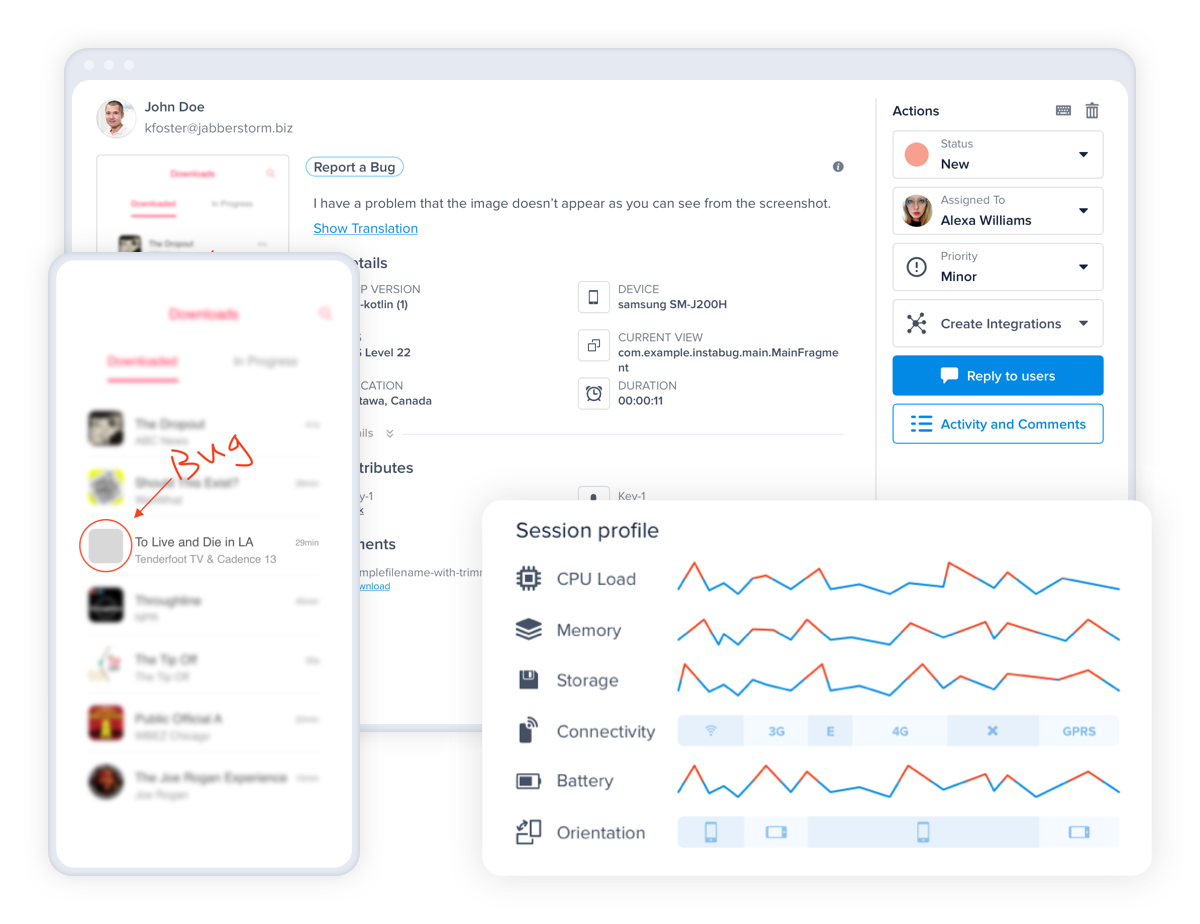
Luciq is the top Android beta testing tool for mobile apps. It provides the most useful metadata on the market, exceptional customer support, and an in-app communication channel to chat with your testers and users.
Issue Reporting and Crash Reporting
With each report, you automatically receive comprehensive data to help fix issues faster, including steps to reproduce errors, network request and console logs, and environment details. For issue reporting, your beta testers can also send screen recordings and annotate screenshots to provide further context.
Mobile-first App Performance Monitoring
View your app's performance from your users' perspective with built-for-mobile performance monitoring that tackles the unique challenges of the mobile experience. Luciq's APM aligns your team around a single overall metric that reflects your app performance and helps you build a culture of performance for your team.
In-App Surveys
Collect user feedback from your beta testers right inside your app to minimize interruptions and boost participation rates. Get powerful insights to enhance your product roadmap with surveys that you can target at specific tester segments and feature request voting to understand user pain points and desires.
Visual Mobile Session Replay
Capture all your app's sessions and watch visual replays to see through your users' eyes. Luciq captures a series of screenshots along with all the events, actions, logs, and more, allowing you to quickly understand the issue, what's causing it, and how to fix it without wasting your time on needless back-and-forth questions. Additionally, you can ensure user privacy out of the box with customizable levels of auto-masking to protect sensitive information.
Android app beta testing is a crucial stage in your application's development lifecycle. Prepare yourself ahead of time and make sure to delve deeper into each aspect of the process. Make sure you cover this checklist ahead of your beta launch.
Most importantly, be sure to communicate with your beta testers and continuously motivate them to provide you with quality user feedback. After all, your app's success depends on them!
Make every beta report actionable
Beta testers find the issues; context gets them fixed. Luciq's Signals attaches repro steps, device state and network logs to every tester report and crash, so your team resolves them before launch instead of after reviews.