










Impact of mobile app launch time on performance
Speed is an essential part of app performance, but stability is king; you should always benchmark your crash-free sessions alongside launch performance to ensure a smooth user experience. Users don't like to wait and they especially don't like slow apps. How fast your app launches, whether that's a cold, warm, or hot start, can shape a user's first impression and play a big role in keeping them around. One report says that 21% of users now abandon an app after one use, and according to a different report, 80% would give a poorly performing app three chances or less before uninstalling it. Your app is fighting for your users’ time and money and needs to make a good impression from the gate.
App launch speed is very indicative of the overall quality of your app and tracking it will help assess the responsiveness of your app. 49% of users expect apps to start in 2 seconds or less. Ideally, you should be targeting an app launch time of 1.5-2 seconds. This, however, is talking about apps launching from scratch, also known as a cold app launch.
Measuring your various app launch times, including cold, warm, and hot starts, will require an application performance monitoring tool in order to track your performance statistics.
How do you measure app launch time?
Development tools and production data measure different things, and both are needed.In development:
- Xcode's App Launch template in Instruments measures time from process start to first frame on iOS, broken into pre-main (dylib loading, static initializers) and post-main (AppDelegate, first view controller load). This is the right tool for profiling and finding where time is being spent before the screen appears.
- Android Studio's startup profiler traces cold and warm launch on Android, showing where time goes in Application.onCreate, Activity.onCreate and rendering the first frame.
In production:
- Platform tools measure launch time in controlled conditions. Production data measures it on real devices, under real memory pressure, on real networks. The two numbers are often different, and the production number is the one users experience.
- Segment production launch time by launch type (cold vs warm vs hot), by OS version, by device model tier, and by app version. A new release that causes cold launch time to increase by 500ms across your mid-range Android user base is a regression even if your simulator shows no change.
- Track median and p95. Median reflects the typical user. P95 reflects the worst 5%, which is often your oldest devices or users with the least available memory.
Mobile app launch types
App launch time comes in three types: a cold launch starts the app from scratch, a warm launch reuses some of it, and a hot launch brings a backgrounded app to the front. Cold launches are the slowest and the ones users feel most. Here's how each type works and how to make them faster.
Cold app launch
In a cold app launch, your app is starting from scratch. This means that the app’s process has not been created by the system until then. Cold launches occur when you are launching the app for the first time since booting, or if the app was killed. Since there is no existing process up and running this is the slowest type of launch. Cold and warm launches are usually the main focus when it comes to minimizing app launch time due to them taking the longest.
Hot app launch
In a hot app launch, your app’s process is already running in the background and all the system has to do is bring your app’s activity to the foreground. This makes it a lot faster than a cold launch because the app’s activity is already present in memory. The system doesn’t have to repeat the initialization so it has much less overhead.
To the user, there is very little difference between cold, warm, and hot launches, which is why it’s important to minimize the time taken in both scenarios.
Warm app launch
As the name suggests, a warm app launch is somewhere between a cold and hot launch where some of the operations that take place in a cold start are still happening. In this case, your app's main process is already running, but might need to recreate some activities or retrieve data that was evicted from memory. This makes it faster than a cold start but still with more overhead than a hot start.
Mobile app launch time benchmarks
The Android Developer Guide currently considers the following startup times to be maximums for acceptable performance:
- Cold launches should take less than 5 seconds
- Hot launches should take less than 1.5 seconds
- Warm launches should take less than 2 seconds
What slows app launch the most?
Cold launch is slow because it does the most work. The things that slow it down fall into three categories: initialization, layout and data.SDK initialization:
- Every SDK you initialize synchronously at app launch adds to cold start time. Analytics SDKs, crash reporters, feature flag clients, push notification registrations: each one takes a few milliseconds. Taken together, they can add 500ms to 1 second to cold launch on lower-end devices.
- Audit your AppDelegate or Application class for synchronous SDK calls. Defer anything that doesn't need to block the first frame. An analytics SDK that initializes after the first screen is visible has no user-facing impact. One that initializes before the first frame does.
Main-thread work:
- Database reads, file I/O, network calls and heavy object initialization that happen on the main thread before the first frame delay launch directly. Move them to background threads and load data progressively: show the first frame with placeholder content while the real data loads.
- Static initializers (in C++ or Objective-C) and Swift global initializations that happen at app load time are a common source of pre-main delay on iOS. Profile the pre-main phase in Instruments if cold launch is slow even before your AppDelegate runs.
Layout complexity:
- A complex first view with many subviews, deeply nested layouts or heavy auto-layout constraint calculations takes longer to render. Simplify the initial view hierarchy, defer loading content that's not visible in the first frame, and consider using a lightweight splash state that transitions to the full view once data is ready.
Mobile-first App Performance Monitoring
Mobile apps run in a huge variety of environments and conditions, and face a unique set of challenges that traditional observability and logging tools are not equipped to handle.
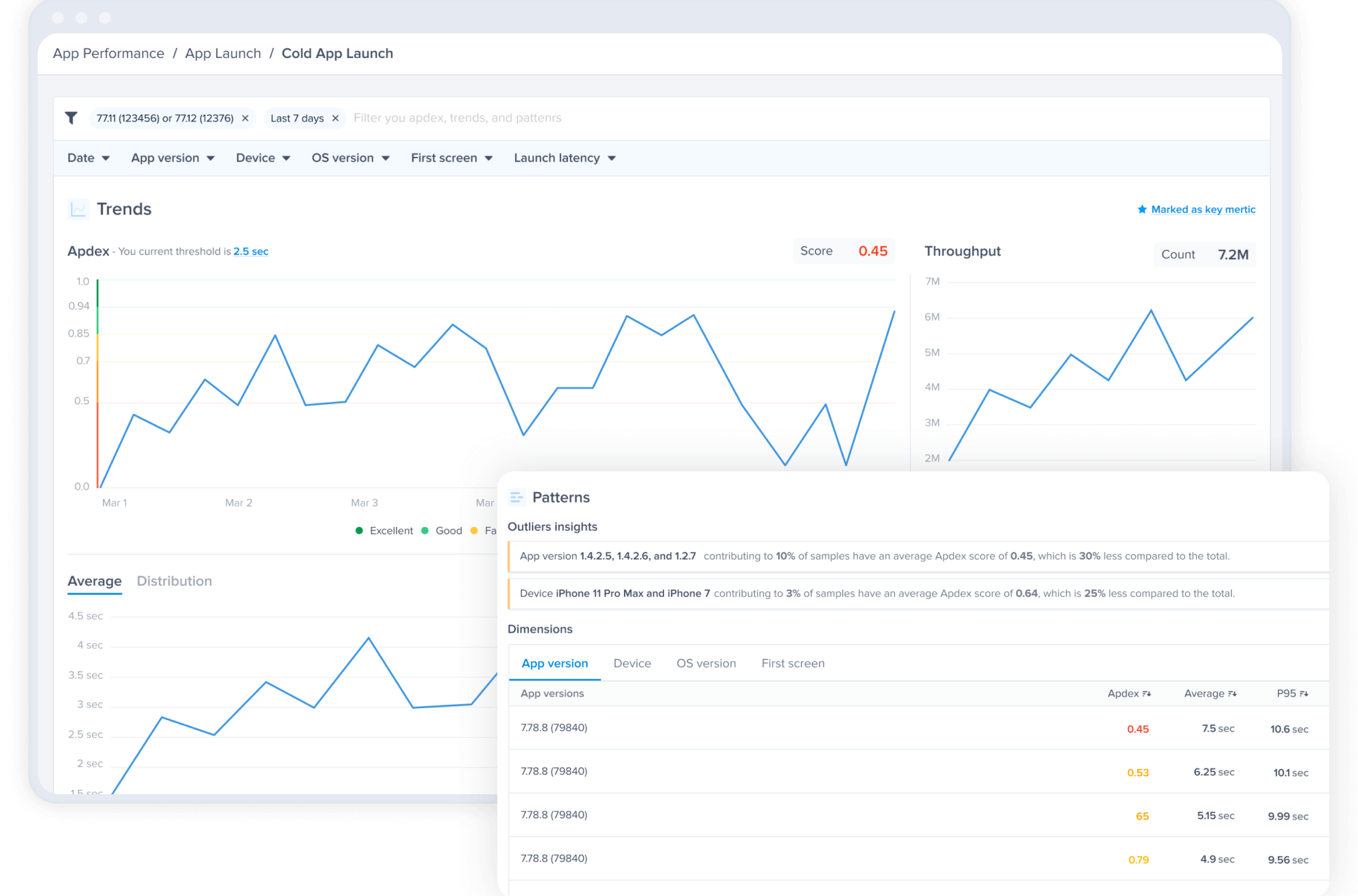
Luciq's App Performance Monitoring helps you track key metrics to improve your app's performance, including Apdex scores, UI hangs, network timeouts and issues, slow launches, tracking custom traces, and more. From the App Launch page in your dashboard, you'll find a detailed breakdown of launch speeds across cold, warm, and hot starts, segmented by version, device, and operating system.
By monitoring and comparing different app versions and app starts (cold, warm, and hot launches), Luciq's APM tool helps you make quick assessments on your app's launch and determine whether it's app or OS related. With the Apdex score, you can quickly assess if a particular launch time is considered poor, average, or good. You can also adjust the threshold for the app launch time you are trying to achieve to better align with your KPIs.
Find what slows each launch
Luciq's Signals breaks app launches into stages on real devices, so you can see exactly where startup time is lost and which users feel it.