










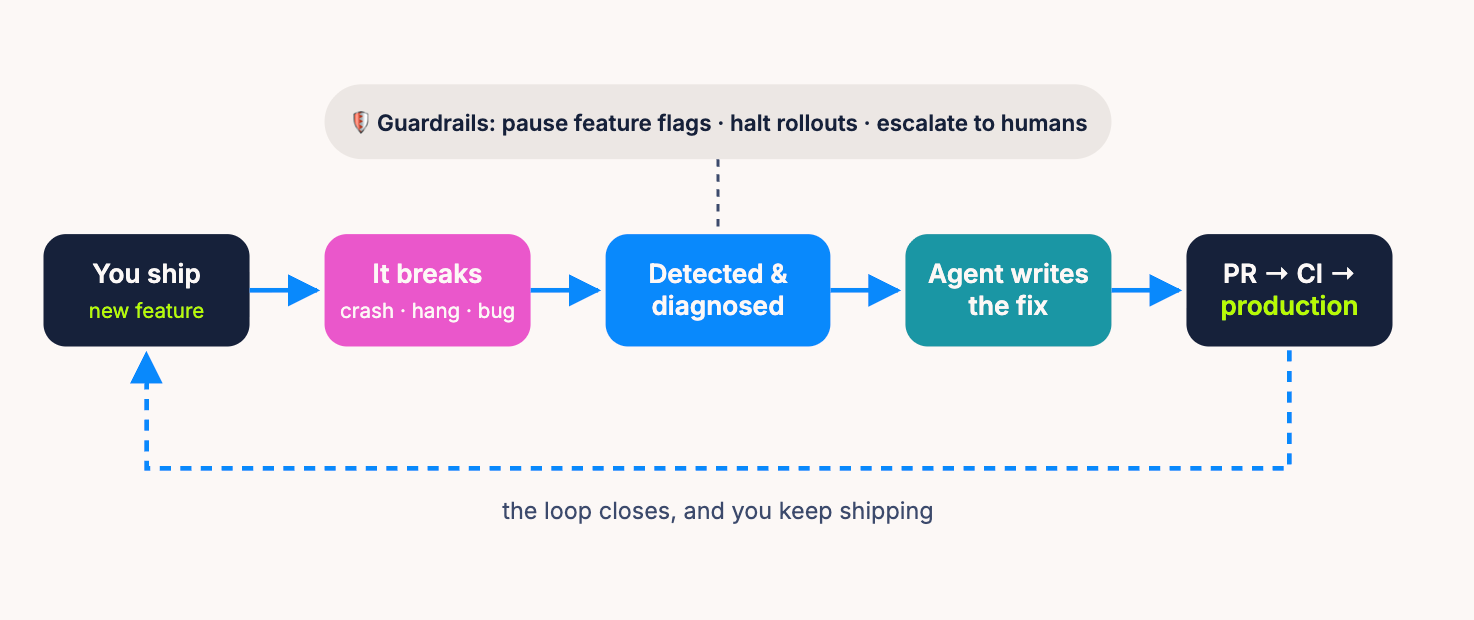
You ship. Something breaks. An agent detects it, fixes it, opens a PR, and it's back in production before your standup. Here's how to actually build that loop.
Every mobile team knows the ritual. You ship a release. Somewhere in the long tail of devices, OS versions, and network conditions, something breaks. A crash spikes. A user files a bug. Someone gets paged, spends an afternoon reproducing it, writes a fix, waits for review, waits for CI, waits for app store review, waits for the rollout. A one-line null check costs your team a week.
It doesn't have to work this way anymore. The pieces now exist to close that loop without a human in the middle of every step. An observability layer detects and diagnoses the issue, an AI agent generates the fix, a PR lands with tests passing, and guardrails protect users while all of it happens.
We call this putting your app quality on autopilot. This aticle is the manifesto, and the practical guide.
Set the foundation
Autopilot fails without instruments. Before you automate anything, three foundations have to be in place.
1. Signals that AI can actually consume
You need a tool that captures the full spectrum of quality signals: crashes, ANRs and app hangs, force restarts, frustrating sessions, performance regressions, bug reports, user feedback. Partial visibility means the loop silently misses entire categories of breakage.
But capture is the easy half. The harder requirement, and the one most teams discover too late, is that the tool must be built for AI consumption. Plenty of observability platforms collect great data and then trap it. Three failure modes to check for before you commit:
The test is simple: can an AI agent ask "what is the most impactful new issue in the latest release, and what evidence do I need to fix it?" and get a compact, complete answer in one or two tool calls? Luciq was designed around exactly this. Its MCP server exposes pre-diagnosed issues with occurrence details, crash patterns, and session evidence already distilled, so agents consume conclusions, not raw telemetry.
2. Capture everything, leak nothing
Autopilot runs on evidence. The richer the context an agent gets, the better its fix: session replay, recordings, logs, device state. That is the whole difference between a guess and a diagnosis.
But the manifesto principle cuts both ways. When you capture everything for the machines, you also capture whatever was on the user's screen the moment it broke. Card numbers, passwords, health records, a home address sitting in a checkout field.
The pattern our PMs and CS team keep bringing back is always the same one. A team turns on session replay, an engineer decides which fields to mask, and one field slips. Nobody notices until that recording is already sitting in a system it should never have reached.
Here is the part most teams get backwards. They treat masking as a review step, a privacy sweep two sprints after capture. But the leak does not start when the recording is stored. It starts the moment an engineer writes the line of code that exposes the field, so that is the only place worth catching it.
That is where we put it. The masking linter runs in the editor, at the point the decision is actually made, and flags unmasked PII while the engineer is still typing: cards, SSNs, passwords, emails, addresses, health data. It runs again in CI, and it can sit as a release gate that blocks the build outright. An engineer stops being the last line of defense against a mistake any human will eventually make.
What counts as sensitive is not the same for a payments app and a hospital app, so the rule set is yours to dial: nothing, SOC2, PCI, GDPR, HIPAA. It runs on iOS and Android with no extra service to stand up, because a privacy control that adds operational drag is a privacy control teams quietly switch off.
3. Feature flags and gradual rollouts, everywhere
Mobile is unforgiving. There is no instant rollback. A bad binary sits in app store review while your crash-free rate bleeds, and even after you ship a fix, users update on their own schedule. Recovery from a small mistake can take days.
So the second foundation: everything you ship goes behind a feature flag, and every release rolls out gradually. 1% → 5% → 25% → 100%, with quality gates between stages. Flags turn "submit an emergency build and pray" into "flip a switch." They are what makes automated pausing possible, and pausing is the safety net that makes autopilot acceptable in the first place.
Rule of thumb: if a change can't be turned off remotely, it isn't ready for the autopilot loop. Kill switches first, automation second.
Decide What's Automated vs. What's on Autopilot
These are different things. Automated means the machine does the work and a human approves it. Autopilot means the machine does the work and ships it, and humans review by exception. Every issue your system touches should be deliberately placed on that spectrum.
1. Calibrate confidence before you calibrate ambition
Not every issue is trivial, and not every environment tolerates mistakes equally. Where an issue lands depends on two axes: how confident the AI is in the fix, and how sensitive the environment is.
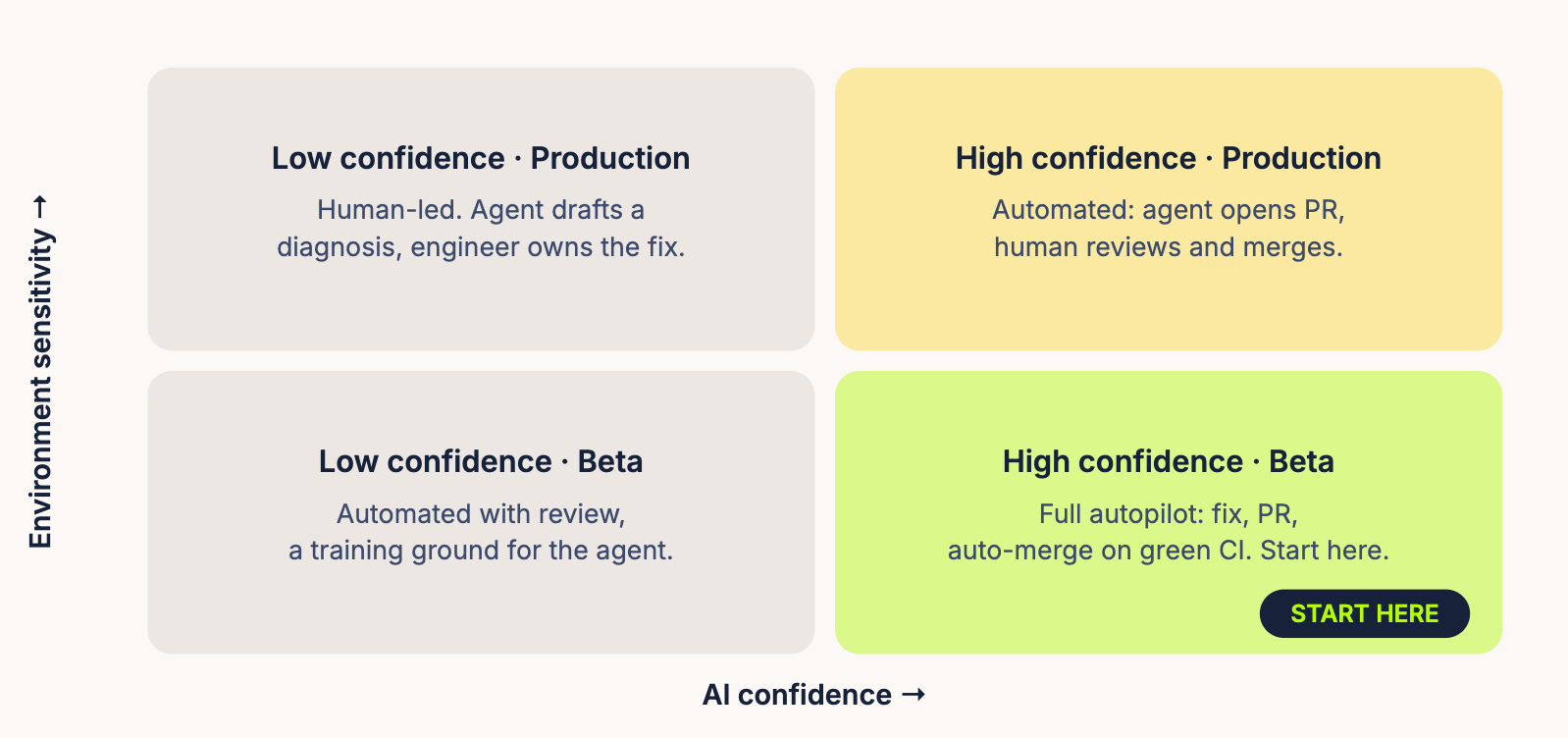
A pragmatic on-ramp:
Start in beta builds. Your beta ring is the low-stakes environment, and issues there are exactly the kind you want an agent cutting its teeth on. Once the agent has a track record, extend to production, but gate by severity and confidence: a low-severity crash with an obvious fix qualifies; a payment-flow regression does not.
Regressions are the perfect first target. A regression comes with the strongest possible evidence: it worked in version N, broke in version N+1, and the diff between them is finite. Confidence is naturally high, so it's the safest class of issue to hand to an agent end-to-end.
Make confidence explicit. At minimum, instruct your agent to grade its own confidence from the evidence before acting:
# Confidence rubric embedded in the agent prompt
HIGH   → clear stack trace + repro steps + regression window
         + fix touches ≤ 2 files          # eligible for autopilot
MEDIUM → root cause identified, fix touches shared code
                                           # PR + human review
LOW    → ambiguous evidence or architectural change needed
                                           # diagnose only, assign to a human
Better still is when the observability layer scores triviality for you, from the evidence it already holds: pattern matches against known crash signatures, blast radius, reproducibility. Luciq provides this confidence signal natively to connected agents, which means your automation rules can key off it directly instead of asking the model to grade its own homework.
2. Wire up the automation
The mechanics are simpler than they sound. A good starting point is a scheduled agent routine, like Claude Code routines, where you pre-write the prompt, point it at your repo, and add your team's instructions:
# Nightly quality routine (runs at 02:00, scoped to the app repo)
prompt: |
  Query our observability MCP for new issues in the latest release.
  For each issue where severity ≤ moderate AND confidence = high:
    1. Read the diagnosis, stack trace, and repro evidence
    2. Locate the fault in the codebase
    3. Write a minimal fix + a regression test
    4. Open a PR titled "fix(auto): {issue-id} {summary}"
       with the evidence linked in the description
  Never touch: payment/, auth/, migrations/
  If confidence < high: post a diagnosis to the issue and stop.
Scheduling works, but it has a built-in weakness: the agent only looks when the clock tells it to. A crash that lands at 09:00 waits seventeen hours for the 02:00 run, and every run starts cold, re-querying for anything new.
The best setup is event-driven: a tool that fires your Claude Code routine the moment something breaks, with the full context attached. Luciq does this through its Anthropic Routine integration. You set a forwarding rule, and when it matches a bug, crash, or APM event, Luciq POSTs the event as structured JSON straight to your routine's fire URL. The agent wakes up with the stack trace, device context, occurrence counts, and repro evidence already in hand. No polling, no cold start, no token budget burned on discovery. Pair it with the Luciq MCP connector and the routine can also query for anything more it needs mid-run.
# Event-driven: Luciq rule fires the routine when something breaks
Rule:   new crash group in latest release AND affected_users > 50
Action: forward to Anthropic Routine
        → POST https://api.anthropic.com/v1/claude_code/routines/<id>/fire
        → payload: crash diagnosis, stack trace, device context, evidence
# Your routine's system prompt takes it from there: fix → test → PR
Same prompt, same guardrails, but now the loop starts the second the issue does. Detection to pull request in minutes, not by tomorrow's cron.
3. You don't need 100% autopilot on day one
Stopping at "agent opens the PR, humans review and merge" is a legitimate steady state. You've still deleted the detect-triage-reproduce-diagnose grind, which is most of the cost. From there, layer in AI PR reviewers as a second set of eyes, require green CI before anything merges, and only enable auto-merge for the issue classes where the agent has earned it. Widen the autopilot surface gradually, based on the agent's actual track record, not your optimism.
4. Guardrails: the layer that makes autopilot safe
The final requirement closes the loop: your observability tool must also protect users automatically. If stability degrades, whether from your code or your agent's, the system should act before a human even sees the alert.
With Luciq this is a rules layer: define stability thresholds that halt a phased release or pause a feature flag the moment they're breached. And because agents can set these rules dynamically through Luciq's MCP server or CLI, protection becomes part of the automated workflow itself:
# Agent ships a fix, then arms its own tripwire via CLI
$ luciq rules create \
    --scope release:5.3.0-rc2 \
    --when "crash_free_sessions < 99.5% OR new_crash_group.affected_users > 100" \
    --then pause-rollout, pause-flag:checkout_v2, notify:#mobile-oncall
This is the manifesto's key inversion: the same agent that ships the fix also arms the guardrail that would catch its own mistake. Safety isn't a human watching a dashboard. It's a property of the pipeline.
What This looks Like in Practice
A concrete run of the loop: your team ships 5.3.0 with a redesigned onboarding flow behind a flag at 10% rollout. Overnight, a null-pointer crash appears on Android 13 devices when users background the app mid-onboarding. 340 affected users. The observability layer groups the crash, ties it to the new flow, marks it a regression from 5.2, and scores it high-confidence. The nightly routine picks it up, finds the unguarded lifecycle callback, writes the fix and a test, and opens a PR with the session evidence linked. CI passes, an AI reviewer approves, and because this issue class is on your autopilot list, it merges. Meanwhile, the guardrail had already paused the flag at 10% the moment affected users crossed the threshold, so while the fix rode the release train, zero additional users hit the crash. Your team found out from the PR in their morning feed. Total human effort: one glance.
That afternoon, they worked on the roadmap.
- Capture everything, for machines first. Quality signals that agents can't consume efficiently might as well not exist.
- Ship nothing without a kill switch. Feature flags and gradual rollouts are the precondition for automation, not an optimization.
- Autopilot is earned, not declared. Gate by severity and confidence; start with regressions in beta; expand on evidence.
- Humans review by exception. Your engineers' judgment is too valuable to spend on triage.
- Guardrails are part of the pipeline. The system that ships the fix must also be able to stop the bleeding, automatically.
Reactive observability asks: how fast can a human respond? Agentic observability asks a better question: why is a human responding at all? The teams that answer it will ship faster, sleep better, and spend their energy where it compounds: building what matters.
Your agents handle the noise. You handle the roadmap.
A sneak peek before you go: everything in this article works very well for quality, but you don't need to stop there. The same loop applies to feature requests and opportunities. Users ask, signals get captured, an agent drafts the implementation, a PR shows up. Imagine your backlog shrinking while you sleep, not just your crash list. That's a story for a future blog post.