







As of September 2026, there are roughly 2.6 million apps on Google Play and 2.7 million on the Apple App Store, according to app-intelligence firm 42matters. With so much competition out there, it's becoming harder and harder to make your app stand out. This app store optimization (ASO) guide explains what areas to focus on and how to optimize each step to boost your app's discovery, downloads, and ranking.
App store optimization is the most cost-effective method to get app downloads. It involves multiple strategies with the goal of increasing the chances of your app's discovery through app store search, subsequently increasing your number of downloads, and pushing your app higher up the charts. Basically, it's SEO for mobile apps.
Optimizing your app to rank higher in search results is a balancing act and requires trial and error to find the formula that's right for your app. However, even if you're new to the world of ASO and you don't have a budget that you can dedicate to it, if you know what to focus on, you can increase your app downloads in a matter of days.
Below is a comprehensive App Store Optimization (ASO) guide with the latest iOS and Android rules for 2026.
App Keywords
When it comes to ASO, the first thing that comes to mind is "keyword tracking." The whole point of ASO is for your app to pop up when users search for certain keywords in the app store. So you need to research all the keywords related to your app that people search for and use those keywords heavily in your product page.
According to Apple, 70% of App Store visitors use search to discover apps, and almost 65% of downloads happen directly after a search, which is why keywords are the most important thing to focus on when you're trying to get more downloads.
Selecting keywords isn't just about finding the keywords with the highest traffic. Certain high-traffic keywords like "game," "news," and "free" have thousands of apps competing for them, including well-established ones with millions of downloads and hundreds of reviews, which makes it harder for new apps to compete. So your task is to find the keywords that are most relevant to your app and balance for traffic and difficulty in penetrating through the competition.
You can do your own keyword research and you can also use tools to help get your app ranked. Check out the link for full details about what each platform offers, but here's a quick list:
ASO Keyword Research Tools

App Market Research
You probably already did this in earlier stages, but market research is vital for ASO. You need to know your target audience, how to approach them, and what they need. You also need to know who your competitors are and what they're doing in terms of app marketing so that you can take it one step further and stand out.
App Market Research Essentials:
- Know your audience (e.g. age, gender, location, education, income)
- Study your competitors (e.g. what they offer, who they're targeting, their unique selling points and value propositions)
- Set your goals (e.g. x number of downloads by y, retention rate of z%)

App Icon
In most cases, the first, and sometimes the only thing that your users are going to see when your app pops up is the icon. Your logo needs to be simple but catchy and designed to appeal to users. Something that they will want to click on!
How do you know if you have a good app logo? A/B testing. Google Play's store listing experiments and Apple's product page optimization both let you test icon variations with real store traffic, and many ASO platforms offer this service as well.

App Icon Tips:
- You want an icon that is clear, recognizable, and memorable.
- Think about what would be catchy to your target user.
- Select colors that represent your brand and identity.
- Don't use photos or overuse effects.
- Refrain from using a lot of text.
App Title
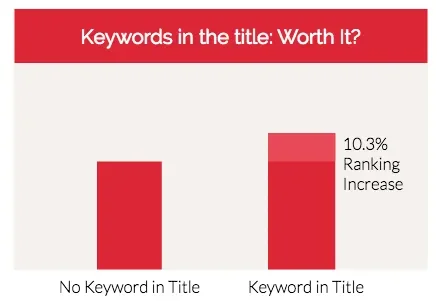
In addition to your app's logo, its title is the other thing that users will see upon first interaction. It needs to be short, catchy, and relevant so that users can understand at first sight what the app does and what it offers. Include keywords in the title without making it look spammy. Keep in mind the maximum app title length, which is 30 characters on both the Apple App Store and Google Play. Google cut its limit from 50 to 30 characters in 2021, and its metadata policy also bans words like "top," "best" and "free" in app titles.
App Title Tips:
- Use keywords and keep it simple, but make it catchy to stand out.
- Avoid confusion with other apps and brands.
- Make it relevant to your brand and identity.
- Communicate the app's value.
- Appeal to a global audience.
App Subtitle (iOS Only)
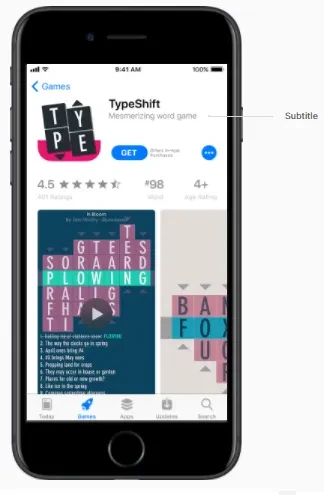
Apple lets you add a subtitle of up to 30 characters below your app name, giving you a chance to briefly describe what your app is all about and communicate your value proposition. This, unlike the actual description, will be visible in the search results. So make it count!
The subtitle field is the perfect place for taglines and also offers another opportunity to use your keywords.
App Description
Your app description is your biggest opportunity to push all the keywords that you want to rank for. Just don't keyword stuff. Keep in mind that your potential users who read this description are still humans, so the description needs to make sense, not just a bunch of keywords stuck next to each other.
Your objective in the app description is to entice people to download it, so start by highlighting how your app solves your target users' problem. Then play around with the wording to incorporate the keywords that people would search for to find your app.
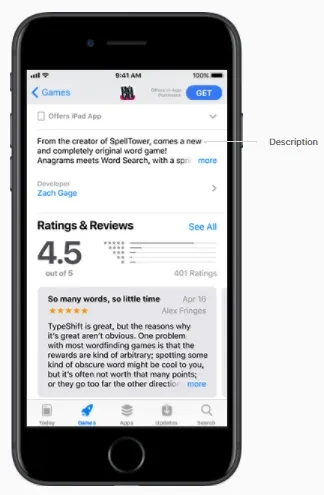
How to Write an App Store Description That Converts
In app store optimization, your description does two jobs: it tells the store what your app is for, and it convinces a person to tap Install. Most people only see the first few lines before the text is cut off, so make those count. A simple formula works for the opening line: [your app] is a [what it is] that [what it does]. Then follow the structure most top apps use:
- A hook: one sentence on what makes the app worth installing.
- A short description: two or three sentences on the main benefit, with a line break after each.
- Features as bullets: short and scannable, because most readers skim.
- Social proof: a real user review or an award that shows the benefit.
- An FAQ, only if there's a question most users ask before installing.
Write for a phone screen, not a desktop. That's where nearly everyone reads it.

App Promotional Text (iOS Only)
The promotional text field is limited to 170 characters. This appears above your app's description. Unlike the description, you can edit this at any time without having to submit a new version of your app.
This field is not indexed, so it doesn't affect search results. However, it can be used to communicate your marketing message, limited-time events, new features, announcements, offers, or discounts in order to entice people to download your app.
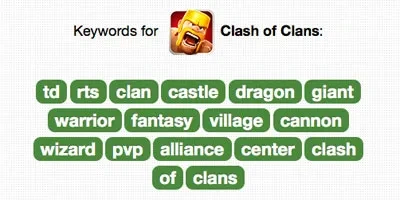
iOS Keywords
Apple lets you choose the keywords that will most affect your app discovery in terms of search results. You have 100 characters to choose as many relevant keywords as you can, separated by commas, so make every last character count.
Again, choose a balance of popular keywords with high traffic as well as keywords that don't have much competition and that you can rank for. A popular method for finding the best keywords is review mining, where you study your competitors, see what keywords their users use the most to describe them in their reviews, and use those keywords to your advantage.
App Category
Most people discover apps simply through browsing through the store, so you need to pick the perfect category for your app.
Now, of course, the category has to be relevant to your app. But picking a category isn't always just about relevance. Consider switching to another semi-relevant category if there's less competition there or if the potential revenue from another category makes it worth it to try. Test out different categories until you find your sweet spot.
If your app is a game, you can also choose up to two game subcategories, a good way to rank for a specific niche.
App Videos
App previews in the Apple App Store and promo videos in the Google Play Store are short videos that allow you to showcase what your app has to offer and are a great tool to encourage users to download your app. These are optional and they don't affect your discoverability through search, but they're highly recommended because a well-done video can drastically increase your conversion rate and downloads.
Avoid basic tutorials about how to use the app. Instead, make the video catchy, highlighting your edge over the competition, and advertising your most compelling features that might not be obvious with just screenshots. For graphics-heavy apps, app preview videos are a must.
For iOS, the app previews can only be 15 to 30 seconds long, so you need to quickly deliver your message. Android apps can have 30-second to two-minute promo videos from YouTube, which gives you more room to play. But keep in mind that users most likely won't watch a full two-minute video if they're not convinced by the first few seconds.
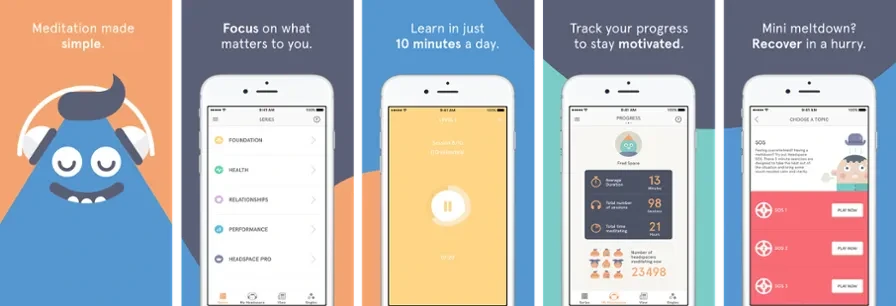
App Screenshots
Don't just take random screenshots of your app. Screenshots are another tool to showcase what your app has to offer, so put some thought and effort into them.
Use each screenshot to promote a key feature of your app, with the most important or valuable one first. Add text that clearly explains the value proposition or what the user will benefit from your app. Play with visuals and colors that would appeal to your target user to make the screenshots pop.
Take it one step further and tell a story with the screenshots, taking the user from one image to the next, increasing their chances of converting and downloading your app.
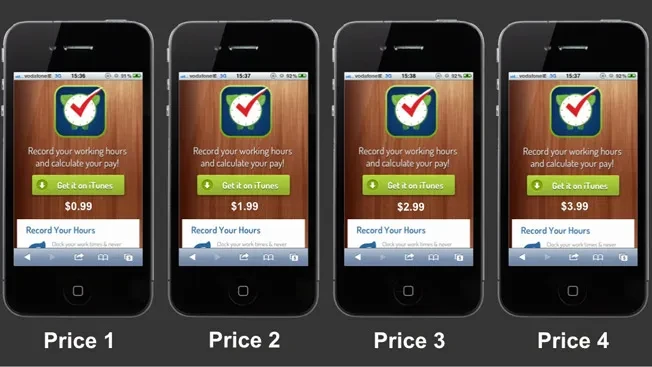
App Price
If you have a paid app, the price is definitely a huge factor that will affect the number of downloads. With so many apps out there, many users might choose to go with a similar app to yours just because it's free.
In order to be successful with a paid app, you need to either have a well-established brand or a very strong and unique selling point that would drive people to pay a few bucks for it.
One problem is that you might not know how much people would actually be willing to pay for your app. In that case, once again, A/B testing is the best approach to experiment and optimize your price by trying out different values.
You can get 100 downloads for your $2 app and get $200, but maybe if you lower it to $1, more people would be willing to buy it and you'd get 500 downloads for a total of $500. The opposite can also be true. Your app might actually be set at a lower price than people are willing to pay, and you're missing out on a large revenue opportunity. So you'll never know until you try!
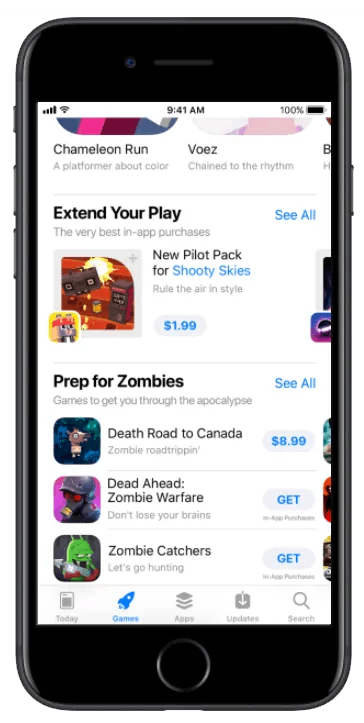
In-App Purchases (iOS Only)
In 2024, the App Store ecosystem facilitated $131 billion in sales of digital goods and services, led by games, photo and video editing apps and enterprise tools, according to a study commissioned by Apple. Apple also lets you promote in-app purchases directly on your product page.
Now you can customize in-app purchases by adding display names, descriptions, and promotional images for each. You'll need to optimize all of these details with keywords and compelling text and images. You can promote up to 20 of them on your product page that users can browse and buy even before downloading the app.
In-app purchases can also now appear in search results, the Games and Apps tabs, or even be featured on the Today page, so they offer even more opportunities for your app to be discovered and downloaded.
App Downloads
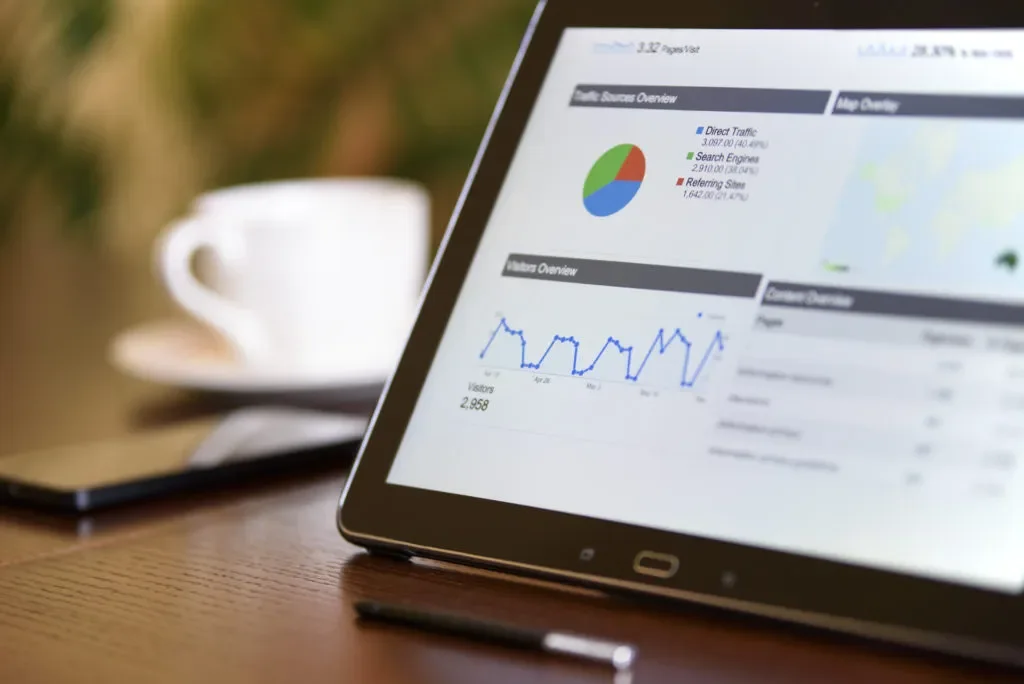
It's widely believed that there's a strong correlation between the number of downloads and the ranking of your app. Although Google and Apple haven't confirmed this theory, app developers throughout the industry have found that the more people visit your page and download your app, the higher your app will rank.
Optimizing things like screenshots and driving five-star reviews to your app doesn't directly affect your app store search ranking. However, these strategies work to help increase your number of downloads and subsequently make your app rank higher.
Promoting your app on different channels or through paid advertising can also be a great way to push downloads.
Best Way to Promote an App:
- Social media, paid and organic (Facebook, Twitter, Google+, Instagram, LinkedIn, Reddit, Quora, etc.)
- Traffic to your app's website, paid and organic (Search Engine Optimization, Google Ads)
- E-mail (direct and newsletters)
- Other referrals (partners, websites, and publications)
App Size
Another important detail that you want to keep in mind is your app size, which could affect your number of installs. Mobile app sizes are becoming way too big, and even though mobile storage spaces are increasing along with them, a lot of people still think twice about how much space an app will take up in their phone. Should they delete their precious cat videos to make room for your heavy app?
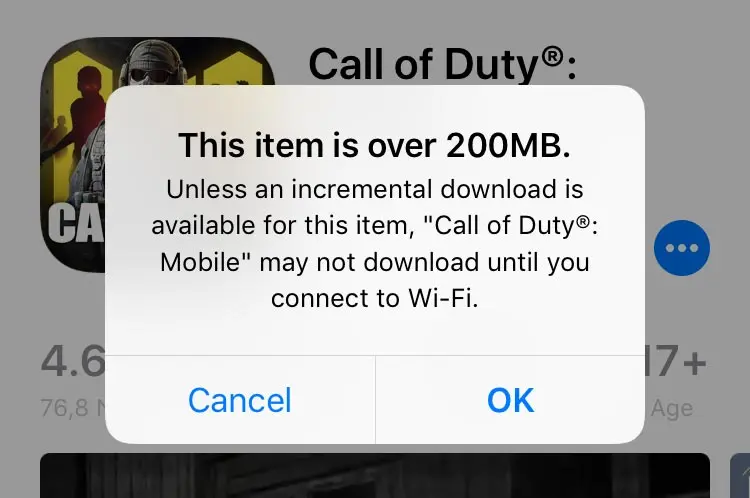
If you have an iOS app, then it's even more crucial for you to make it as small as you can. By default, iOS asks users before downloading apps larger than 200 MB over cellular data, which can stall an install. This will turn a lot of potential users away who'd rather not wait until they're connected to WiFi to download your app when they could just download another one that is smaller in size.
App Reviews and Ratings
Ratings have a direct effect on downloads. In NP Digital's 2024 analysis of 49 companies, an app rated 4 stars converted at 83% of the rate of a 5-star app, and a 3-star app at just 57%.
Ask people to review and rate your app, but pick the best time to do it. Apple shows its rating prompt to each user at most three times in a 365-day period, so you need to be smart about it. You need to know what your optimum feature or user flow is and have your rating prompt event-triggered by that action. Basically, ask your users to rate your app at the exact point when they're most likely to give it five stars.
In-app feedback is definitely a must for all mobile apps, whether during beta testing or production. Giving unhappy users a way to reach you inside the app, before they reach the store, keeps that frustration out of your reviews. Contextual in-app surveys get up to 3X more responses than traditional web surveys.
Both stores let you reply to reviews, so make sure to go through them regularly, reply to negative ones, and solve their problems as soon as possible. You also have the choice to keep your accumulated ratings with each new release or reset them at any point.
Why App Quality Is an ASO Ranking Factor
Keywords and screenshots bring people to your listing. App quality decides whether they install, stay and leave a good review, and the stores notice. Google Play may make an app less discoverable when more than 1.09% of its daily users hit a user-perceived crash or more than 0.47% hit an ANR, and it can show a warning on the store listing when a single phone model crosses 8%. Quality shapes ratings too. Luciq's 2026 Mobile App Performance Playbook found that apps rated above 4.5 stars cluster near a 99.95% crash-free session rate, while apps under 3 stars cluster near 99.82%. In Luciq's survey of more than 1,000 U.S. app users, 50.3% said crashes and glitches are the biggest deal-breaker that would make them leave a negative review.
That's why prioritizing by the loudest one-star review rarely works. Luciq ties every app store review to the release, feature and issue behind it, so you can see exactly which change pulled your rating down. You can prompt users to rate your app at the right moment, right after a great experience, and route unhappy users into a support conversation before they reach the store. When the cause is a crash, you can fix it before the next review lands, and recurring review themes become a ranked list of what to build next. One UK financial services company that uses Luciq went from below four stars to 4.8 on both iOS and Android.
App Localization
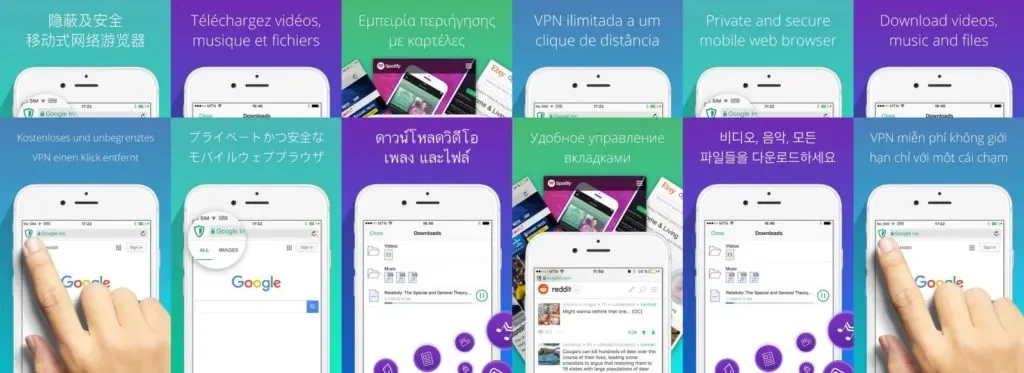
Localization pays off beyond translation. In CSA Research's survey of 8,709 consumers in 29 countries, 76% said they prefer to buy products with information in their own language, 40% said they never buy from websites in other languages, and 73% want product reviews in their own language.
Targeting your app only to the US and Europe just won't cut it anymore. You'll be completely excluding and missing out on a large global market and a huge source of revenue that you could tap into by localizing your app. In some of the largest app markets, the preference for local-language content is even stronger: in the same CSA Research study, it reached 94% in Taiwan, 92% in Korea and China, and 90% in Japan.
Also in terms of ASO and keyword tracking, what works in one country might not work in another. One keyword could be very popular for one demographic, but almost never used by another. So you need to customize everything accordingly to appeal to the largest number of users in your target audience as possible.
App Updates
Regular updates pay off: in Luciq's No Margin for Error report, regular updates and fixes were the top reason users stay loyal to an app, cited by 57%. This helps you build a good relationship with your users, keep the app on their minds, and in a way, lets them know that you're always working to update and improve your app.
Aim to update your app at least once a month and, at most, once a week. Just make sure that the update actually adds value, that it includes a new feature or fixes something in the app. Don't just update for the sake of it, as releasing a new build for no apparent reason could have an adverse effect.
ASO is a process of trial and error. You will have to try out different strategies and measure and analyze all of the outputs. With continuous refinement and optimization, you will end up increasing the number of your app's downloads, pushing it higher up the charts, and ultimately increasing your revenue.
Luciq, the first Agentic Mobile Observability platform, connects every review, crash and slowdown to the release behind it, so you can protect your rating and spend more time building what matters. See how the platform works.
TL;DR
App Store Optimization (ASO) requires trying out different strategies and measuring and analyzing the results of each. With continuous refinement, you'll increase your app's discoverability, its number of downloads, its ranking, and ultimately your revenue. Here's how:
- Optimize your app's keywords
- Conduct market research
- Design an attractive icon
- Optimize your app's title
- Optimize your app's subtitle (iOS)
- Optimize your app's description
- Optimize your app's promotional text (iOS)
- Select the right keywords (iOS)
- Find the right category
- Advertise your app's unique selling points in a compelling app preview/video
- Showcase your app's key features with creative screenshots
- Optimize your app's price
- Optimize the details of your in-app purchases (iOS)
- Increase your app's number of downloads
- Minimize your app's size
- Improve your app's ratings
- Keep crash and ANR rates low to protect your visibility and ratings
- Localize your app
- Update your app regularly