











How well do AI coding assistants resolve mobile app crashes? We tested leading assistants on the same set of iOS and Android crashes and compared how often each found the root cause and produced a usable fix. Here's what the results mean for mobile teams adopting AI in their debugging workflow.
To assess each tool’s capabilities, we conducted standardized testing using a diverse dataset of real-world crashes paired with ground-truth human-written fixes. These fixes were curated and reviewed by senior mobile engineers across Android and iOS.
Unlike the testing process used in our AI model benchmarking report, where the model was only provided with the parts of the source code relevant to the issue, all coding assistants had access to the entire source code and had to identify and retrieve the relevant code without help. However, the stack trace for the evaluated crashes was manually provided to the coding assistants for context, except in the case of SmartResolve, which automatically retrieves the stack trace through Luciq’s crash reporter.
Each generated fix was evaluated against five key criteria with a different weight assigned to each:
- Correctness (40%): How effectively the generated fix resolves the crash and prevents its regression.
- Similarity (30%): How closely the fix resembles a human-written solution.
- Coherence (10%): The clarity, structure, and logical flow of the generated code.
- Depth (10%): How well the fix identifies and addresses the root cause rather than merely treating symptoms.
- Relevance (10%): How well the fix aligns with the crash stack trace and code context.
These metrics were combined into a weighted total accuracy score to provide a comprehensive evaluation of each tool’s performance.
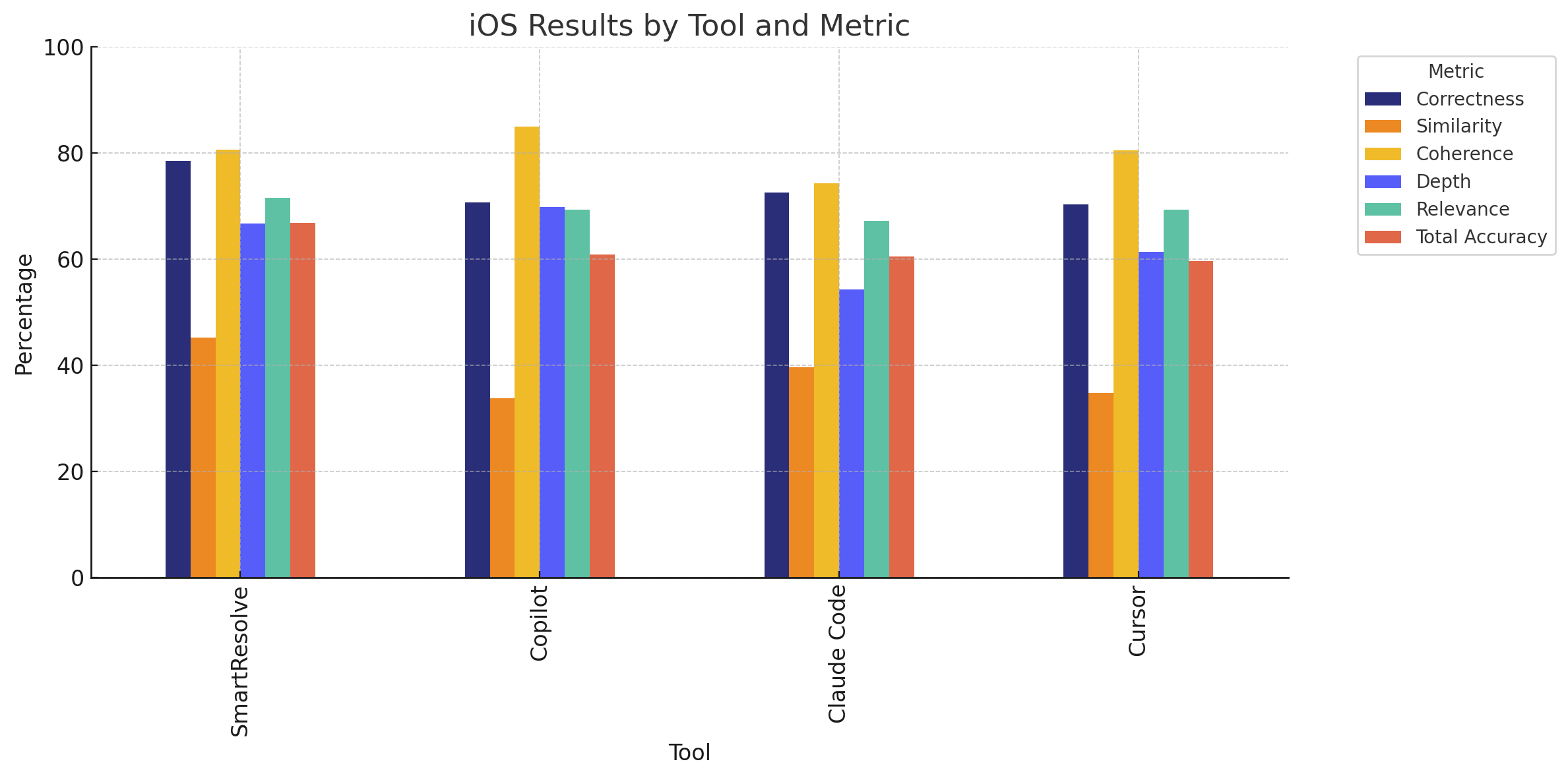
The iOS platform reveals significant performance differences between tools. SmartResolve demonstrates a clear lead with 66.81% total accuracy, outperforming competitors across most metrics. Notably, unlike the results of our AI model benchmarks, all tools show significantly lower scores across all criteria on iOS compared to Android. This suggests that iOS crash fixes may involve platform-specific nuances that make root cause analysis and the retrieval of the offending code more challenging for AI tools.
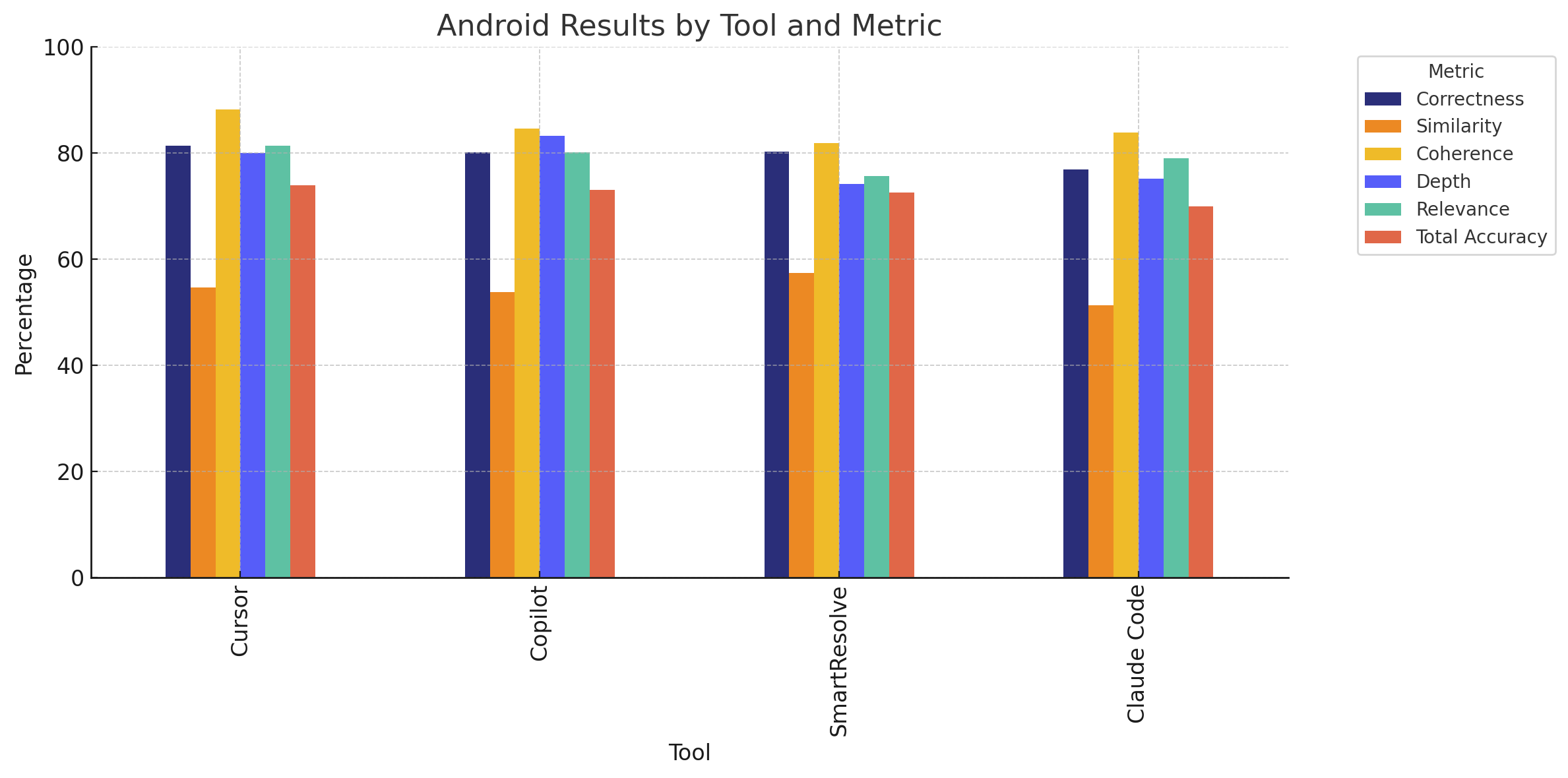
On Android, the results show remarkably close performance among the top tools. Cursor takes a narrow lead with 73.85% total accuracy, followed closely by Copilot and SmartResolve. While Cursor excels in correctness and coherence, SmartResolve demonstrates superior similarity to human-written fixes while maintaining a comparable score for correctness. Claude Code trails behind but still delivers a solid performance across all metrics.
Platform-Specific Performance Patterns
Most tools demonstrated stronger performance on Android than iOS, particularly in similarity to human-written solutions. This suggests that iOS crash resolution may involve more complex platform-specific patterns that make root cause analysis and the retrieval of the offending code harder for general-purpose AI coding assistants to address.
Strength Areas by Tool
- SmartResolve: Shows exceptional performance on iOS and delivers fixes most similar to human-written solutions on both platforms.
- Cursor: Excels in correctness and coherence on Android, showing strong capabilities for structured code generation.
- Copilot: Demonstrates balanced performance across both platforms with particular strength in addressing root causes (depth).
- Claude Code: Maintains consistent performance across platforms but generally trails the other tools.
The Similarity Challenge
All tools scored lower on similarity than on other metrics, indicating that while AI tools can generate functionally correct fixes, they often approach problems differently than human developers. This has implications for code maintainability and integration into existing codebases.
AI coding assistants prove most valuable for:
- Accelerating initial response to crash reports
- Providing starting points for more complex fixes
- Handling common crash patterns with established solutions
However, human review remains essential, particularly for:
- Complex crashes involving multiple interacting factors
- Fixes requiring a deep understanding of app architecture
- Cases where code style and maintainability are critical
Why SmartResolve Wins on Practicality
While code assistants like Copilot and Cursor excel in code generation scenarios or generic suggestions, SmartResolve goes further:
- Streamlined workflow
SmartResolve eliminates the need for switching between tools to manually retrieve the stack trace and provide it to the AI coding assistant for context, delivering the fix with a couple of clicks. - Purpose-built for mobile crash resolution
It understands stack traces, source maps, and mobile app architecture, not just how to generate generic code. - Human-in-the-loop control
Developers remain in charge, with tools to review, select, and customize fixes as needed. - Built-in context
Uses crash metadata and source code context to deliver accurate, grounded suggestions.
Mobile crash resolution presents unique challenges that differentiate it from general-purpose code completion, requiring a specialized understanding of domain-specific patterns, crash diagnostics, and mobile app architecture. Teams that thoughtfully integrate these AI tools into their workflows stand to significantly reduce mean time to resolution while maintaining high code quality standards.
As AI coding assistants continue to evolve, we expect to see further improvements in their ability to generate human-like, platform-optimized code fixes. However, the most effective approach will likely remain a human-in-the-loop model, where AI tools accelerate and augment rather than replace the expertise of mobile developers.
Give your coding assistant better context
Assistants perform best with the full picture. Luciq delivers stateful mobile context, the exact gestures, screen and network state before a crash, into Cursor, Claude and other assistants in token-efficient form, so they reason over what happened instead of guessing.